This is the fifth post in a series about self-publishing from ideation through sales. To check out other posts in this series, click here.
In the last post for this series I wrote about
formatting, the prep for publishing. Now is time to get into the nitty gritty of publishing.
This is a behemoth of a post with info about jacket summaries and cover art, so get comfortable. Let's talk about the thing you've been waiting for - the thing that makes an indie author, well, indie.
Digital Power
The bread and butter of indie publishing, the thing that really launched independent authors was the ebook. This is to authors as the MP3 is to musicians. It revolutionized the publishing world and allowed authors to take control of their publishing destinies
directly - something that is completely novel (heh) in the history of publishing.
Also, publishing an ebook is something that a monkey can do.
Really.
Author
Joe Konrath once challenged people to write and publish an ebook in 8 hours. And people did it. A lot of people did it. Because it is
so dang easy.
The difference between publishing an average ebook and a
good ebook is
formatting (assuming all else is equal). If you have your formatting done by professionals, through a reliable template, or you're old hat at the process, you're golden.
Jacket Summary
Before you get to the publish page of
Smashwords (my preferred e-publisher/distributor for its wide reach and high royalty percentage) you need to spend a little time on descriptions.
There are usually two descriptions you need to write - the short, which shows up on all online retailers, and the long, which only gets pushed to a few.
To be honest, I open a separate document which I save to my book folder as "Book Title Summary" and write as compelling a summary as I can, without concern for length. I know my long description is always shorter than the character count.
There are a lot of resources on how to write jacket summaries, but the thing that I've found the most helpful is:
- Look at best-selling book summaries in the same genre.
- Don't give everything away.
- Somewhere in your closing paragraph or last sentence use this formula: "[main character] must do [certain action] or [result]."
This formula is the 140 character Tweet you'll send out to catch people's attention. It's the lead for your elevator pitch. It's the thing that will get someone to buy the damn book. That said, this won't always work. Sometimes a description does well without this formula. For example here is the long description for
BELOW THE BELT:
Alisa Greer excitedly begins her doctoral program in anthropology when
she meets Dr. Corwin Pierce. An awkward genius, she swears his eyes
change color as a result of the light, and his cold appearance can only
be a figment of her imagination. Yet as Alisa gets closer to Pierce,
things even more bizarre start happening on campus and at archaeological
sites that all link back to him. Students go missing under strange
circumstances and inexplicable displays of light occur at ancient sites
across the globe. Frightened and fascinated, she can only begin to guess
who or what he is. But the truth is more disturbing than she can
imagine...
My quick and dirty way to get the short description is cut this down to size in the field on the publishing page. The key is to get the content and interest generation despite the shorter length. Here's the short description I have for the same book:
Alisa Greer excitedly begins her doctoral program in anthropology when
she meets Dr. Corwin Pierce. As Alisa gets closer to Pierce, bizarre
things start happening on campus and at archaeological sites that all
link back to him. She can only begin to guess who or what he is, but the
truth is more disturbing than she can imagine...
Book Covers
Never judge a book by its cover, unless it's an ebook.
That may as well be the message of most "indie publishing gurus." As much as authors may wish people would not judge books by covers, they do. And let's face it, if an author doesn't spend the time to make their cover look nice, how can you be sure they spent the time on their book?
I say this, knowing full well I spend a shit-ton of time on my covers. In fact, they give me a tremendous amount of grief...and they don't look like anyone else's.
I did that on purpose because I wanted the art to reflect the nature of the stories. For the
Khloe Alwell series, I wanted the covers to hint at an artist's sketchbook. The main character is an artist, and art is referenced throughout the books.
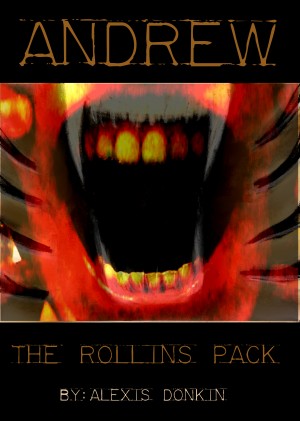
That said, I am not a graphic artist. I've spent a lot of time and effort earning the knowledge of cover design I have, and it's imperfect. I went from horrible covers when I first started out, to something that is passable, and finally, with my new
Rollins Pack covers, to something that is sort of, well,
good.
You can, if you don't want to deal with this mess, pay someone else to make your cover. In fact, I would advise you do that if you have the resources to do so. If not, or if you're not concerned with graphics and just want a simple cover for a business book or something, use templates. There are a thousand and one sites that have resources for this.
If you choose to go the DIY route, do that. I never did that because, I have some art training and I wanted to learn the photo-editing skills it would take (also I didn't have the cash to pay someone else at the time).
If you're crazy or beyond broke, you can do what I did. Download
GIMP for free (yay open source!). If you've worked with Adobe before, GIMP will feel relatively natural. If not, play around with it for a while. Spend some serious time doing this. Figure out the ideal scale for your cover, make sure to have it at least 300 DPI, and go to town. Download some free for commercial use fonts (there are a gagillion sites for this) and enjoy.
NOTE: This will take you a week of tweaking, especially if this is all new. Be patient and prepared to swear at your screen. Have things that are safe to throw nearby. And take breaks.
Categories
This is something that is somewhat arbitrary and mystical. For many books, the categories you choose will be cut and dry, but for others, you have wiggle room.
I honestly have no idea what categories to choose for most of my fiction - well, I should say, I struggle with categorization. But categories are important because this is how new readers may find you.
Actually, I lied. I know exactly what categories to choose.
Choose the categories your ideal reader would choose.
*Blinks*
Who is this mythical ideal reader? For the Rollins Pack, they're late teen to early twenty-something males. For Khloe Alwell, they're the same age, both male and female, who are deep into nerd culture. So sometimes labelling these books as YA is good, and then again, maybe it would be better to label them "new adult." My deciding factor was the age of the main character - so I keep them YA (If this is confusing, don't worry. We'll touch on this again in marketing and sales.).
PUBLISH!
Everything's entered on the publish page. You set a preliminary price (probably between 2.99 and 4.99 for the average ebook) and hit the publish button. You select all the different file types (of course!) and click through. Your book is in queue. You get an email saying it had no autovetter errors (if it did, follow the directions in the email). Now it gets reviewed and then, assuming everything's good (which is should be if you have good formatting) your book gets pushed to all the major online retailers.
Sit back and smile.
You are now an independently published author.
*******************
If you have tips or tricks on descriptions, cover art, or categorization (or like a different digital distributor) leave a comment below! I love learning more about indie publishing and I know other readers will too!
Also check out my next post in this series on publishing print-on-demand where I will talk about the differences in that process.
And please support your local, lovely indie bootstrapper, by visiting my website
to donate or buy my books! All the links on my site give me maximum
royalty percentages, as opposed to supporting big companies.